Convivial tools are those which give each person who uses them the greatest opportunity to enrich the environment with the fruits of his or her vision. - Ivan Illich
Old Computer Challenge community is a smol group of enthusiasts, who come together every year to experience new and old things.
The goal of this year's challenge is to hand-make something. My goal is to learn a bit about programming the Game Boy Advance. Tentatively, I'd like to write a simple rom to simulate Conway's Game of Life.
Journal follows.
july 6
Decided on the Game Boy Advance as my old computer of choice.
It's (darkly) funny to me that I'd have to pay $99/mo to develop apps for my own phone, but instead I could write old console roms and just use the Delta emulator for free.
I am a complete novice to low-level programming (and was otherwise
distracted by the 2019 game Control that I suddenly remembered exists)
so today I mostly did some reading and compiled some resources. In the
interests of keeping things low-level, I'm planning on using
devkitarm and libtonc.
Here are a few links I've found useful so far:
- class notes from Ian Finlayson (archived version)
- Rodrigo Copetti's overview of the Game Boy Advance's architecture
- Tonc, a developer's guide
> listening to: Nel Nome Del Codice - Keygen Church
july 7
The most performant approach to graphics on the gba seems to be through its tiles/sprites system. Thankfully the graphics for the game of life are basically as simple as possible -- background-colored pixels (black, say) for dead cells and foreground-colored pixels (white, say) for live cells. We'll start with no background tileset for now, so all we have to worry about is using the sprite system to display the cells.
sprite math
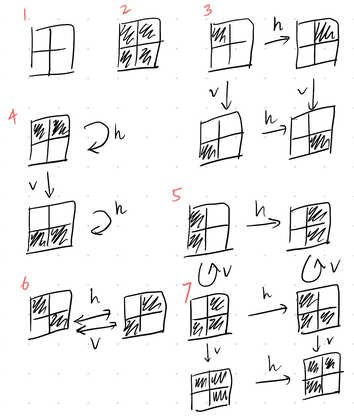
The smallest sprite size, 8px-by-8px, is probably the move here. For now I'm thinking of drawing each cell as a 4px-by-4px square (so that they're hopefully actually visible), which means that each sprite will be a 2-by-2 grid of cells. Naively, 4 cells corresponds to 24 = 16 sprites needed to represent all possible states of this 2-by-2 grid of 4 cells. One trick we can use, though, is that the gba has options to display sprites flipped either horizontally, vertically, or both horizontally and vertically. This reduces the number of sprites needed to only 7. Really there's only 6; the sprite of all dead cells doesn't need to be draw to begin with.
Let's back up for a second. The gba's screen is 240px-by-160px. Ignoring, for a moment, the fact that we probably won't be using 100% of the screen, this comes out to a 60-by-40 grid of cells (equivalently, a 30-by-20 grid of 8px-by-8px sprites). That seems pretty reasonable to me.
game of life
The game of life proceeds in discrete time steps in a two-dimensional
grid world. I have yet to decide whether the world is finite or wraps
around to form a torus (think: the asteroids game). The state of the
world at time t+1 is determined completely by the state at time t.
More specifically, the state of a given cell at time t+1 is determined
completely by the number n of live cells among its 8 nearest neighbors
at time t by the following
rules:
- any live cell with
n=0,1will die - any live cell with
n=4,5,6,7,8will die - any dead cell with
n=3becomes live - all other cells remain unchanged
Without thinking too hard about performance optimizations for the moment, the basic logic of the simulation is straightforward. We start with an initial world state stored in memory as a 2-dimensional matrix, as well as a second matrix in which the next time step's world state is computed. Each time step, the necessary life/death computations are carried out, the two matrices are swapped, and the new world state is drawn as sprites.
sprites
Following the Tonc guide, we find that to render sprites and backgrounds we need to set:
- control: overall graphics and tile settings
- data: the actual pixel-by-pixel data for each tile together with palette data
- mapping: where which tiles should be displayed
The boilerplate code is a lot more sophisticated than I initially
expected -- I've been using Tonc's basic/obj_demo as an initial
reference, but there's quite a bit to unpack. I'll return to this in
more detail tomorrow.
> listening to: Facets - Paul Griffin
july 8
Not much time or energy today, but I got started on writing a simple game of life simulator in c. I don't have much experience programming in c, so I thought it might be a good idea to get the basics down before I get lost in gba-specific details.
❯ clang main.c -o main.o && ./main.o
-- t=0 --
. . . . .
. o o . .
. . o . o
. . . o .
o . . . .
-- t=1 --
. . . . .
. o o o .
. o o . .
. . . o .
. . . . .
-- t=2 --
. . o . .
. o . o .
. o . . .
. . o . .
. . . . .
-- t=3 --
. . o . .
. o . . .
. o . . .
. . . . .
. . . . .
The approach is the straightforward one: maintain two matrices, set the second to the step-evolution according to the rules of the game of life, and then swap the two matrices (one small detail: I'm taking all lattice points that are out of bounds to be dead... it would be a pretty simple change to the function computing nearest neighbors to convert this world-in-a-box to a torus). I always get confused by c arrays and pointers, but I think this segment of code is reasonable?
bool* world_ptr = &(world[0][0]);
bool* new_world_ptr = &(new_world[0][0]);

printf("-- t=0 --\n");
ptr_display(world_ptr);

for(int t = 1; t < T_MAX; t++) {
    printf("-- t=%d --\n", t);
    step(world_ptr, new_world_ptr);
    ptr_display(new_world_ptr);
    bool* tmp = world_ptr;
    world_ptr = new_world_ptr;
    new_world_ptr = tmp;
}
I don't know much about c code style either, so I'm sure that doesn't help. Either way -- it seems to work for now, so tomorrow I'll have to stop procrastinating and start learning about the gba.
> listening to: Colorful Sounds - Tommy '86
july 9
Even less time today, and I spent most of it trying to understand
Tonc's basic/obj_demo, which displays a sprite (from a Metroid game)
and allows d-pad movement (with some extra tile manipulation options).
The sprite seems to be compiled down to data in an assembly file
metr.s from png by a utility called grit. I find it a bit odd that
the first demo uses something so complicated -- I would have preferred
hard-coded sprite and palette data (but maybe it's my fault for not
really reading the bitmap graphics section first).
I'll try to work out the data encoding tomorrow, but for now it looks
like setting tile data and palette data is done by modifying
tile_mem[4][] and pal_obj_mem[].
> listening to: Yvette Young at Secret Sky 2021
july 10
Ok, I think I pieced together the basics of how this works. Once a certain graphics flag is set, each pixel is defined by 4 bits (one digit of hexadecimal). 4 bits ranges over 16 values corresponding to a palette of 16 colors. Consider the following example
TILE t = {{0x11110000, 0x11110000, 0x11110000, 0x11110000,
           0x00000000, 0x00000000, 0x00000000, 0x00000000}};
tile_mem[4][0] = t;
pal_obj_mem[0] = 0x0000;
pal_obj_mem[1] = 0x7FFF;
Here the tile defines, row by row, 8 rows of 8 pixels. The first row has
the first 4 pixels using the second color of the palette (indexed by
the 1) 0x7FFF, which is white in the gba 15-bit encoding. The last 4
pixels use the first color of the palette, which is always taken to be
transparent.
There are still some things I'm not totally solid on. For one, the pixels are displayed right-to-left (low nibble to high nibble). I also haven't looked into the details of the flags setting the sprite size (recall that a sprite may be composed of multiple tiles) or the details of palette banks, etc. The goal for tomorrow is to understand this and get started on displaying a world-state.
> listening to: Consign to Oblivion (live at the Zenith) - Epica
july 11-12
Had an old friend visiting, met up with more old friends, and had a grand old time. No computing was attempted (old, or otherwise).
july 13
I think the challenge is technically over, but as suspected, I haven't had much time to work on it so I'll continue it on my end until I get to a nice breakpoint.
july 26
I've got a decent handle on the basics of sprites now, so I've moved
on to trying to display a t = 0 state of the world. I haven't got it
quite right yet, and since I have no idea how to get print statements
working via the mgba emulator logs, I instead figured out how to hook
up a debugger:
- Make sure that the executable is compiled with debug info (the
makefile I copied over from the Tonc tutorial had this covered with
the
-goption inCFLAGSI think). - Start an emulator session with debugging enabled via
which by default seems to start a server atmgba -g gba-game-of-life.gbalocalhost:2345. - Start the debugger with
and the prompt, connect toarm-none-eabi-gdb game-of-life.elfmgba:
From here, we're good to debug as needed, e.g.target remote localhost:2345break main
> listening to: I Love My Computer - Ninajirachi
august 4
Managed to get a t = 0 state rendered!

I'm embarrassed to report that I spent about an hour debugging why the
cells were being rendered transposed when I set positions via x=i (the
row) and y=j (the column). I had thought perhaps that a few years of
working in corporate america couldn't possibly turn my brain into so
much mush...
The next goal is to get basic time-evolution working (just on this small 6x6 for now).
> listening to: Not The Essential Mix - Cynthoni
august 7
Well that wasn't so bad. I spent some time confused about how c deals
with two-dimensional arrays/pointers and how it passes things around in
functions, but after accepting my fate and writing obscure incantations
of the form *(world + i * WIDTH * sizeof(bool) + j) instead of the
too-maintainable world[i][j]...

we've got a rudimentary sim of Conway's game of life! Next up: embiggening and embettering. Oh and also putting it up in a repo somewhere so I don't have to rewrite this mess.
> listening to: Jiwa Krungu - 8110118
august 11
I suppose much of the painful groundwork is over, because a little bit of work on the plane went a long way today. It's feels nice to be productive without an internet connection. Here's a list of changes, ordered from biggest to smallest:
- Moved from a 6x6 square grid of 36 cells total to a larger, 24x16 rectangular grid. Along the way I had to clean up a few confusions between rows/columns and x/y coordinates that only revealed themselves upon switching to a rectangular grid. The rectangular grid feels more natural for now, given the gba's 3x2 aspect ratio. With this larger grid, we're now using something like 96 of the maximum 128 foreground sprite-objects that the gba can handle.
- The A button now pauses and unpauses the simulation, while the L/R
buttons decrease and increase the speed of simulation! The tools
provided by
toncmade this very straightforward. - The upper bound for the number of sprite-objects in memory is 128, which is why we take each sprite to represent a 2x2 subgrid. Translating between the in-memory array representing the grid of cells and the 4-fold smaller array of sprites is a bit of a tedious string of if-spaghetti that determines which sprite (and horizontal or vertical flip bits) corresponds to which set of 4 dead/alive cells. I improved the spaghetti a bit and now use a switch but I suspect there's a better way to handle it. I don't yet know anything about profiling, so I can't say whether my change improved performance at all, either.
- Regarding LSP and emacs things... I'm using
compiledbso thatclangknows about the libraries I'm pulling in. I triedbearbut it just gave me a blankcompile_commands.json. Admittedly I haven't really looked closely at theMakefile; it's mostly just a copy-paste from Tonc. As a final point, I reformatted the code vialsp-format-buffer, which I imagine just callsclang-format.
I have a couple of ideas for next steps, but I think I had better learn how to display text and a border around the grid, so I can some semblance of UI going. It'd also be nice to learn about profiling, but that'll probably require a bit of research and an internet connection.
> (still) listening to: Jiwa Krungu - 8110118